
AI Copilot
Ask questions in plain language and get instant answers from your factory data.
How to use it
Navigate to AI Copilot from the sidebar. Type your question in plain language — no special syntax needed. The copilot searches your data and returns an answer with supporting details.
AI Dashboard & Alerts
The AI Dashboard surfaces proactive insights — anomalies in production, cost trends, quality issues — without you having to ask. AI Alerts notify you when something unusual is detected, like a sudden drop in yield or an unusual spike in expenses.
Learning objectives
- Ask in plain language from the AI Copilot page
- Confirm the answer on the underlying report
- Use the AI Dashboard and AI alerts as prompts, not as decisions
Walk the screen
- Open AI Copilot. Type one question. No special syntax is required.
- Include a period and a subject, such as yield or a supplier.
- Open the report that holds that subject and confirm the figure.
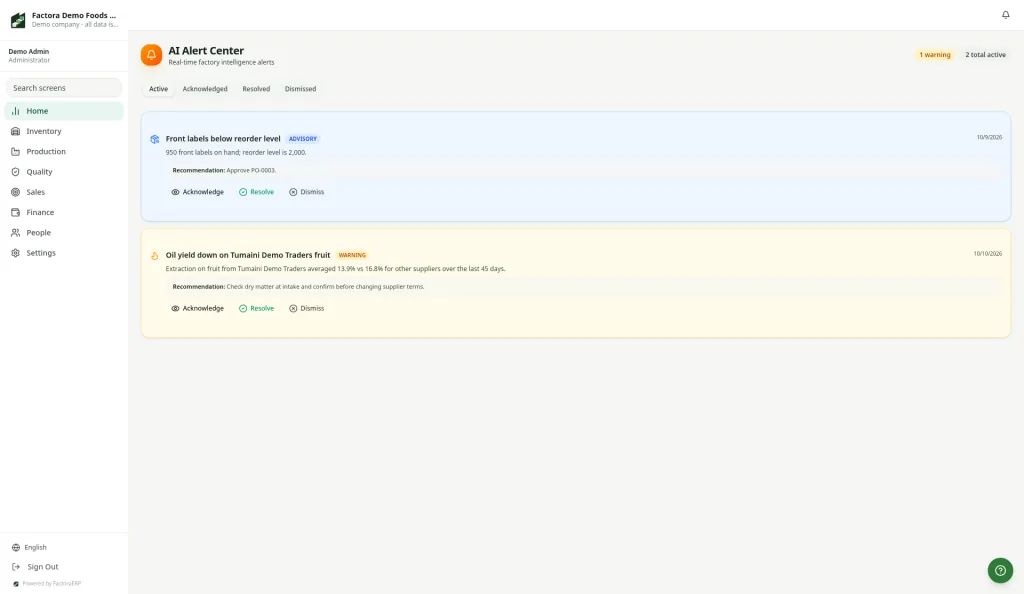
- Open AI Alert Center at
/f/<company-slug>/ai-alerts. The demo warning is Oil yield down on Tumaini Demo Traders fruit, 13.9 percent against 16.8 percent. - Use Acknowledge, Resolve, or Dismiss only after a person has checked the production report. The buttons do not replace that check.
- Use the factory-operations copilot lesson for the rule that you remain responsible for the decision.
Worked example
AI Alert Center shows oil yield down on Tumaini Demo Traders fruit, 13.9 percent against 16.8 percent. You open the production report for the same fruit before you stop a line. The review gets the report, not only the alert text. The Copilot page, separately, is Quick Prompts with an empty input until you ask something.
Practical tip: Acknowledge means you have seen it. Resolve means the cause is handled. Dismiss is not a way to hide a yield drop you have not checked.
Common mistakes
- Acting on an alert without opening the report.
- Asking three questions in one sentence and trusting a blended answer.
- Treating the dashboard as a person who approves lots.
Recap
- Plain questions go to AI Copilot.
- The dashboard and alerts surface anomalies.
- A person confirms and decides.