
Professional · Running a Winning Demo Module: Step 2: Delivering the demo
Structure the session and keep it interactive.
Three acts
- Their problem - restate what you heard in discovery
- Their day in Factora - walk a real batch from intake to dispatch
- Their result - show the dashboard and reports an owner would check
Pause after each act and ask: is this how it works for you?
Learning objectives
- Restate the discovery problem before any record is opened
- Walk one batch from Material Intake through to dispatch using their words
- Finish on the Dashboard and the reports an owner would check, then ask if this is how it works for them
Walk the screen
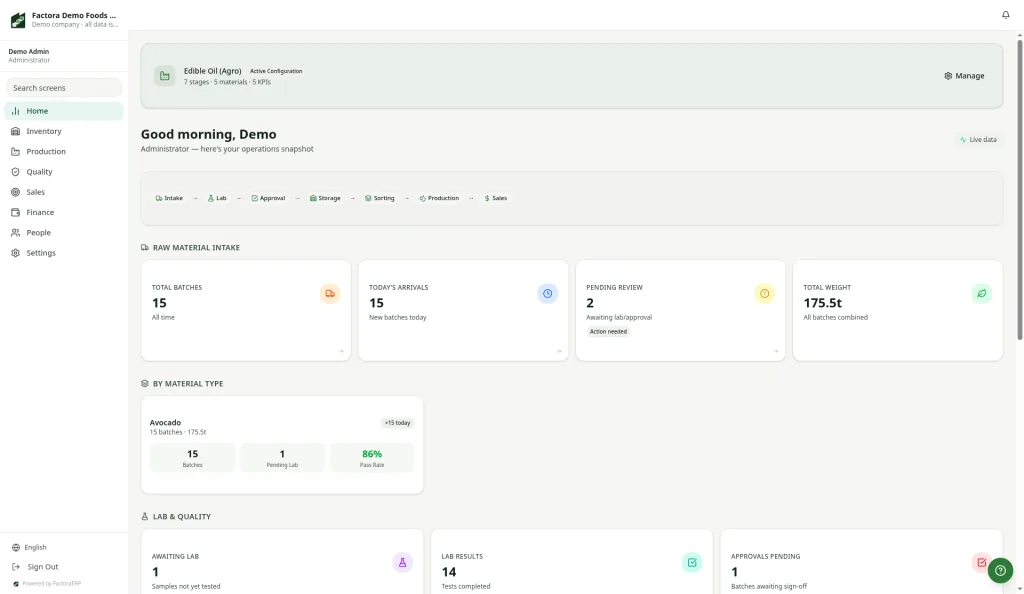
- Act 1, their problem: read back the bad day from the discovery note. Do not click yet. Ask whether you heard it correctly.
- Act 2, their day: open Material Intake and show a lot being received. Move to the lab, then the warehouse or production step they named, and stop at dispatch only if they sell from the same record.
- Keep the same lot reference on screen so they see it was not re-typed.
- Act 3, their result: open the Dashboard KPI cards and Lab Quality at
/f/<company-slug>/reports?tab=lab, the view an owner would check the next morning. - After each act, stop and ask: is this how it works for you? Write the correction into the note.
- End by naming the three modules you showed and the one decision they still need to make.
Worked example
For the sample oil plant, act 1 restates the audit that could not tie a customer lot to a delivery. Act 2 receives a demo truck, shows the lot on Lab Results, and opens Traceability. Act 3 is the Dashboard KPI cards plus Lab Quality at /f/<company-slug>/reports?tab=lab. You pause after act 2 when they say the lab is a different person. That person goes on the follow-up list.
Common mistakes
- Starting on the Dashboard before you have restated their problem.
- Switching lots between intake and dispatch so the story looks like re-typing.
- Talking through all three acts without asking if this is how it works for them.
Recap
- The three acts are their problem, their day in FactoraERP, and their result.
- One lot reference runs through act 2.
- Pause after each act and write down the correction.