
Inventory Management
Track raw materials, work-in-progress, and finished goods across all storage locations.
Inventory overview
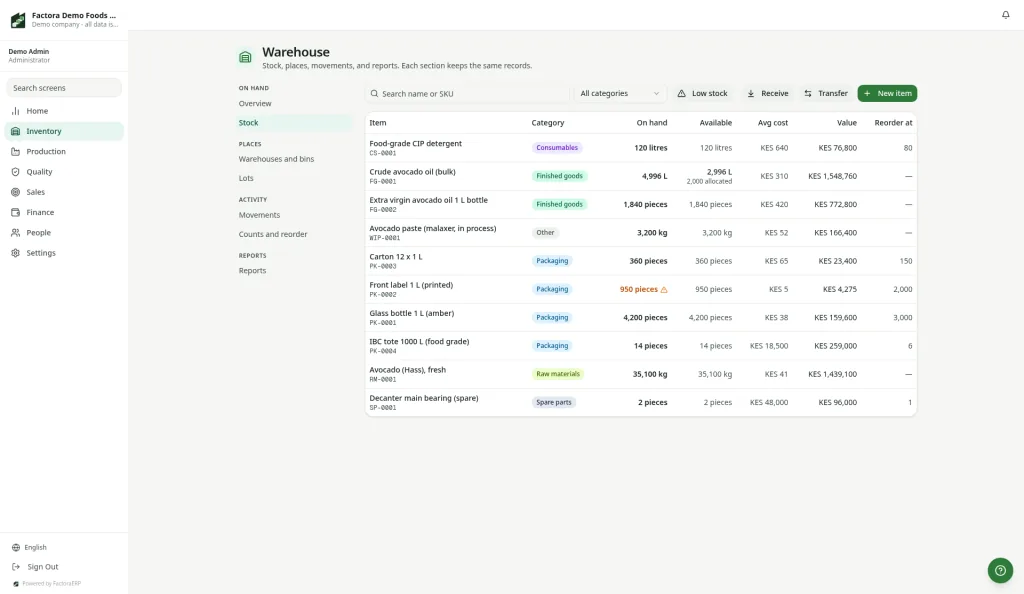
Open Warehouse, Stock, at /f/<company-slug>/warehouse/stock. The screen is a table with category, on hand, average cost, and value. It has no location column, and the rows are not grouped into sections. Use search when the list is long. Locations are a different screen.
Storage locations
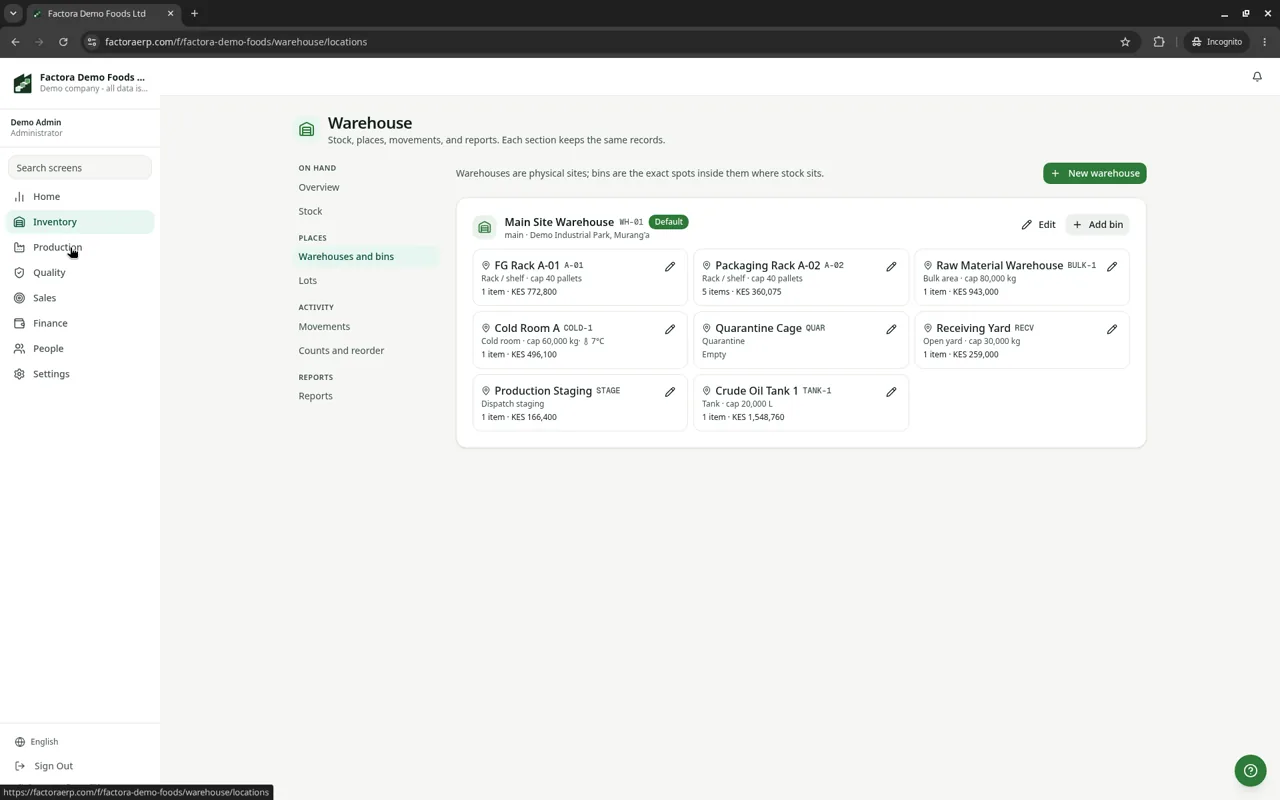
Open Warehouse, Locations, at /f/<company-slug>/warehouse/locations. The demo locations are Main Site Warehouse, Cold Room A, and Crude Oil Tank 1, each with an item count and a value. A single lot, such as DFB-0010 in Cold Room A, is on Warehouse Lots at /f/<company-slug>/warehouse/lots.
Stock movements
Every intake, production run, sale, or transfer updates inventory automatically. You can also make manual adjustments (e.g. for damage, evaporation, or stock counts) with a reason code for auditing.
Alerts and reorder points
Set minimum stock levels for critical items and raise a purchase order before the bin is empty. The captured Dashboard is KPI cards, not a stock-alert feed.
Learning objectives
- Read the stock table: category, on hand, average cost, and value
- Define warehouses, tanks, or cold rooms and keep every batch in one
- Adjust stock only with a reason, and set minimum levels for alerts
Walk the screen
- Open Warehouse Stock at
/f/<company-slug>/warehouse/stock. Read category, on hand, average cost, and value. Search when the list is long. Do not expect a location column. - Open Warehouse Locations at
/f/<company-slug>/warehouse/locations. Main Site Warehouse, Cold Room A, and Crude Oil Tank 1 are the demo places. - Let intake, production, sales, and transfers move the quantity. Do not type a new on-hand figure over the top.
- For damage, evaporation, or a stock count, record a manual adjustment and a reason code.
- Set a minimum on a critical item and raise a purchase order before the bin is empty.
- Find the bin on Warehouse Lots, not on the stock table. DFB-0010 is in Cold Room A.
Worked example
Cold Room A is a location, and lot DFB-0010 sits in that bin on Warehouse Lots. The stock table still shows category and on-hand quantity, not the bin. A count that is short is an adjustment with a reason, not a silent overwrite.
Practical tip: if someone asks where a lot is, open Lots. If they ask how much of an item you hold, open Stock.
Common mistakes
- A batch with no storage location.
- An adjustment with a blank reason.
- Ignoring the reorder alert until production stops.
Recap
- Stock is a table of category, on hand, average cost, and value.
- Locations are Main Site Warehouse, Cold Room A, and Crude Oil Tank 1. Lots name the bin.
- Alerts use the minimum you set.