
Approvals & Workflows
How the approval system works for purchases, payroll, leave, and other requests.
How approvals work
Many actions in FactoraERP require approval before they take effect — purchase orders, payroll runs, leave requests, and more. When someone submits a request, it appears on the Approvals page for authorised approvers.
Approval chains
For high-value items, approvals can chain through multiple people (e.g. manager then director). The system moves the request through each level automatically.
Learning objectives
- Submit the request and find it on Approvals
- Expect a chain, such as manager then director, for high-value items
- Use the specific correction and rejection actions where the module has them
Walk the screen
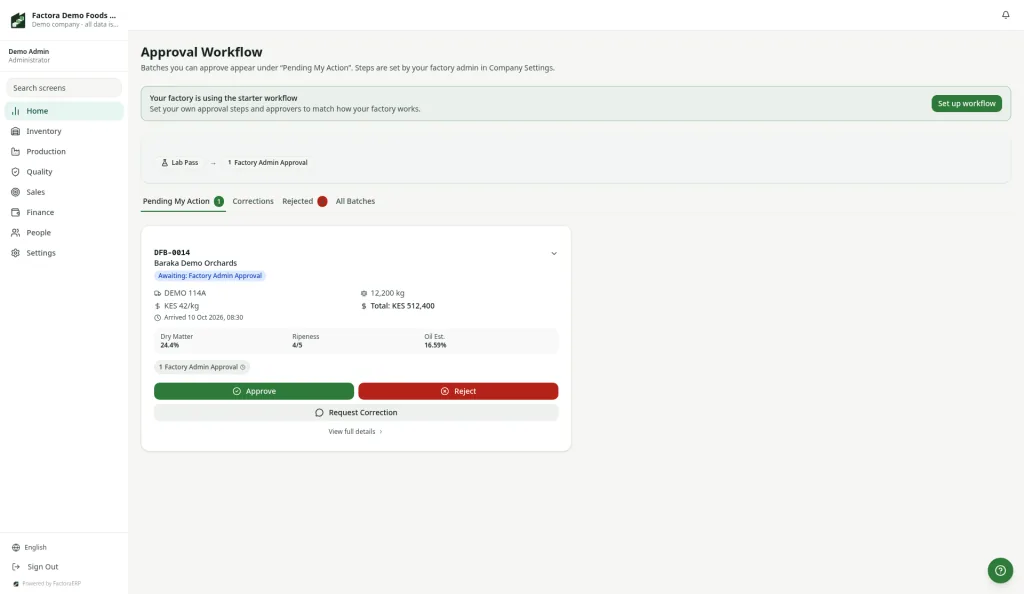
- Submit the purchase, the payroll run, the leave, or the lot from the module that creates it.
- Open the Approvals page as the authorised approver. The item should be listed.
- For a single-step request, approve or reject there.
- For a high-value item, expect the next person in the chain to receive it after you. Do not try to complete their step.
- On lots, prefer the factory-operations actions: Approve, Request Correction, and Reject.
- On payroll and leave, follow those guides: the preparer does not approve payroll, and nobody approves their own leave.
Worked example
A demo purchase order is submitted by receiving and appears for the manager. The manager approves the first level. The director still has the next level. Receiving does not mark it fully approved in chat.
Common mistakes
- Approving in a message and leaving the item pending.
- One person completing every level of a chain.
- Using Reject on a lot when the only problem is a wrong price.
Recap
- Approvals holds purchase orders, payroll, leave, and other submitted requests.
- Chains move level by level.
- The person who submitted is not the person who finishes the decision.