
Lab Results & Testing
Record lab analyses, compare results against quality standards, and approve or reject batches.
Submitting lab samples
After intake or during production, send a batch to the lab by creating a lab request from the Lab Results page. Specify which tests are needed (e.g. moisture, acidity, colour, contamination).
Recording results
Lab technicians enter test results against predefined parameters. Each parameter has an acceptable range — results outside the range are automatically flagged. You'll see a clear pass/fail indicator for each test.
Approving or rejecting batches
Based on lab results, an authorised user approves or rejects the batch. Approved batches continue to the next stage; rejected batches can be held, reprocessed, or disposed of according to your quality protocols.
Certificates of Analysis
Generate a Certificate of Analysis (CoA) from any completed lab record. This PDF document is often required by customers and export authorities to verify product quality.
Learning objectives
- Create a lab request for the tests the batch needs
- Enter results and read the pass or fail flag against the range
- Approve or reject, and generate a certificate of analysis when the customer or the shipment needs it
Walk the screen
- Open Lab at
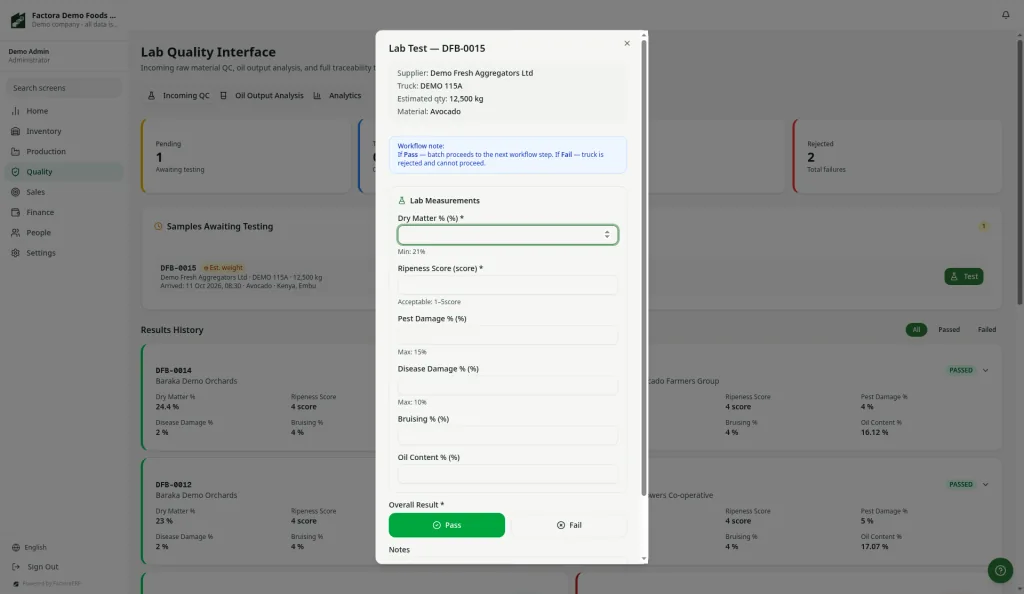
/f/<company-slug>/lab. The figure is the empty Incoming QC form Lab Test - DFB-0015, with dry matter, ripeness, pest, disease, bruising, oil, and Pass or Fail. - The technician enters each parameter. A result outside the acceptable range is flagged, with a pass or fail indicator.
- An authorised user approves or rejects the batch from those results.
- Approved batches continue. Rejected batches are held, reprocessed, or disposed of under your quality process.
- Generate the certificate of analysis from the completed lab record when a customer or an export shipment needs the PDF.
- Use the factory-operations lesson for the Incoming QC fields and the rule that Lab Failed cannot be produced.
Worked example
The figure is the empty form for DFB-0015, not a finished result. Fill dry matter, ripeness, pest, disease, bruising, and oil, then Pass or Fail. A Fail needs a fail reason and that lot cannot go to production. Use the factory-operations lab lesson for the sample method.
Common mistakes
- Approving a flagged row without reading the range.
- Generating a certificate from an incomplete request.
- Rejecting in email and leaving the batch approved on the screen.
Recap
- Requests name the tests. Ranges flag the results.
- Approve continues the batch. Reject holds, reprocesses, or disposes.
- The certificate comes from a completed lab record.