
Setting Up Your Factory
Step-by-step guide to configuring your company, choosing an industry pack, and inviting your team.
Register your company
After signing in for the first time, you'll be prompted to register your company. Enter your company name, country, and industry. This creates your organisation workspace and starts your free trial.
Choose an industry pack
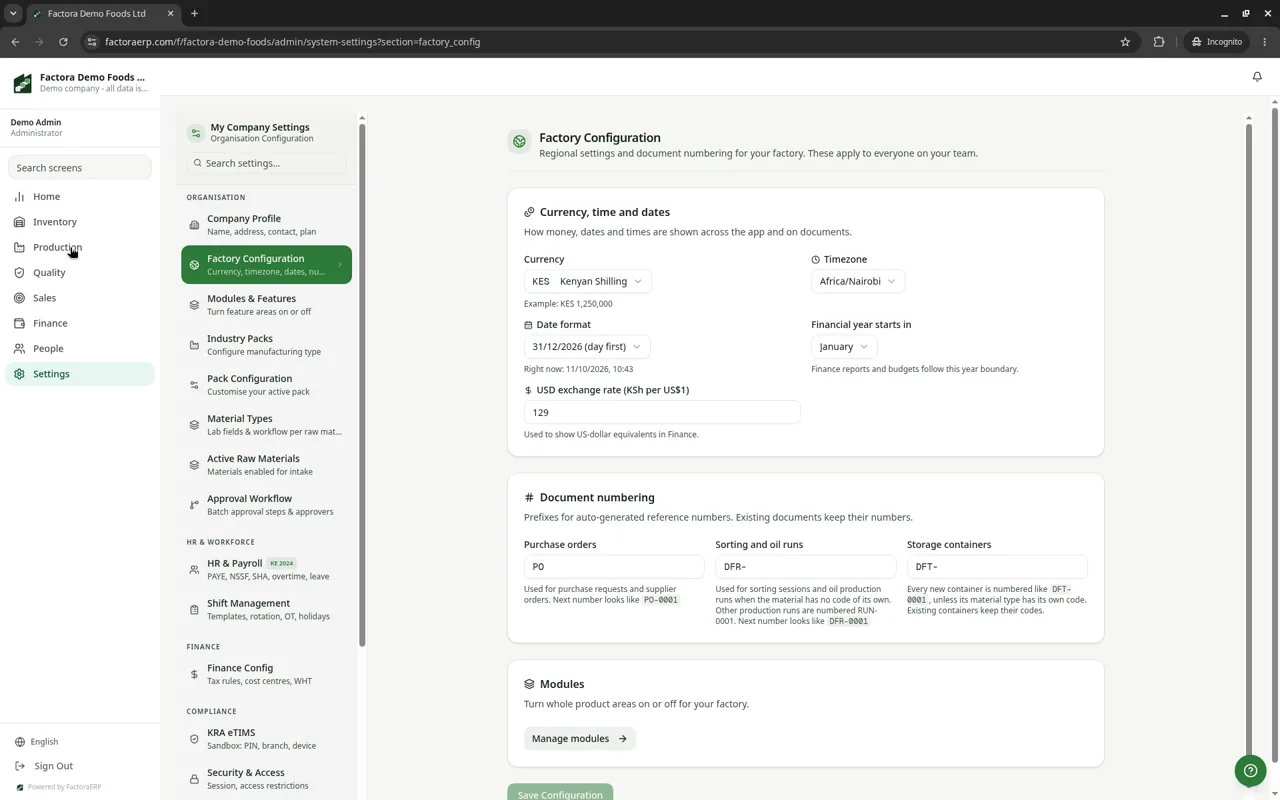
Industry packs pre-configure your production stages, quality parameters, and terminology to match your manufacturing type (for example food processing, edible oil, coffee, or dairy). Choose the pack during setup. The System Settings page captured for this lesson shows currency, timezone, date format, and the fiscal year start. It does not show the pack list.
Add suppliers and staff
The onboarding wizard walks you through adding your first supplier and first staff member. You can skip these steps and come back later from the Suppliers and HR pages. We recommend adding at least one of each so the platform feels real from day one.
Invite your team
Go to Administration → User Management to invite colleagues by email. Assign each person a role (e.g. Production Manager, Lab Technician, Finance Manager) — this controls which modules they see and what actions they can take. Roles can be changed at any time.
Customise your settings
Open System Settings at /f/<company-slug>/admin/system-settings to set currency, timezone, date format, and the fiscal year start. On the demo factory the fiscal year starts in January. These settings apply across modules, so set them before the first truck.
Learning objectives
- Register the company and choose a pack such as food processing, edible oil, coffee, or dairy
- Invite each person from User Management with a role
- Set currency, timezone, date format, and fiscal year start in System Settings
Walk the screen
- Register the company with its name, country, and industry. This creates the workspace.
- Choose the industry pack that matches what you make. The pack sets production stages, quality parameters, and terminology. Food processing, edible oil, coffee, and dairy are the packs this guide names.
- Add a first supplier and a first staff member in the wizard, or return later from Suppliers and HR.
- Open Administration, then User Management. Invite colleagues by email and assign a role such as Production Manager, Lab Technician, or Finance Manager.
- Open System Settings at
/f/<company-slug>/admin/system-settings. Set currency, timezone, date format, and fiscal year start. The demo fiscal year starts in January. - Sign in as the invited user and confirm their sidebar matches the job before they record a live lot.
Worked example
The demo company picks the coffee pack during setup, invites a lab technician, and sets the fiscal year before anyone logs an intake. A week later they open System Settings and confirm currency, timezone, date format, and that the fiscal year starts in January.
Common mistakes
- Inviting everyone as an administrator.
- Choosing a pack because it was first in the list.
- Leaving currency, timezone, or the fiscal year unset.
Recap
- Company, pack, supplier, staff, invitations, then System Settings.
- Roles decide the modules each person sees.
- System Settings on this page is currency, timezone, date format, and the fiscal year start.