
Equipment & Maintenance
Register factory equipment, schedule maintenance, and track downtime.
Registering equipment
Go to Production → Equipment to add your machines and equipment. Record the asset name, type, location, purchase date, and maintenance schedule. Each asset gets a status (operational, under maintenance, or decommissioned).
Tracking downtime
When a machine goes down, update its status. The Shop Floor module shows real-time machine availability so production managers can reassign work. Downtime history is available in reports.
Learning objectives
- Register the asset with name, type, location, purchase date, and a maintenance schedule
- Set status to operational, under maintenance, or decommissioned
- Read downtime history from reports after the status changes
Walk the screen
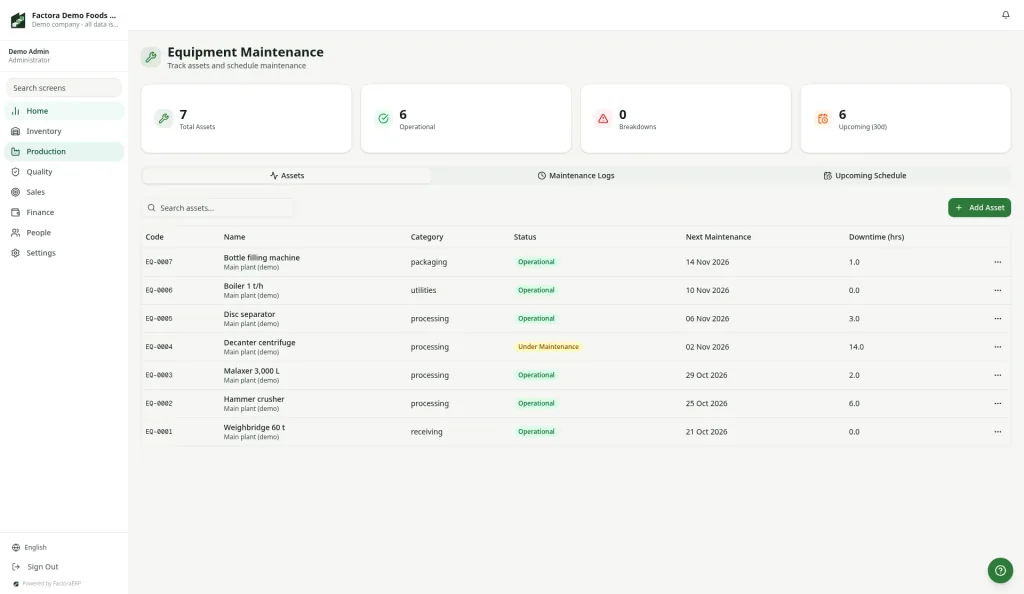
- Open Production, then Equipment. Add the machine with its name, type, and location.
- Record the purchase date and the maintenance schedule you actually follow.
- Leave the status operational only when it can run.
- When it stops, set under maintenance. Shop Floor uses that status so a planner can reassign work.
- When it will not return, set decommissioned. Do not delete it if history still points at it.
- Open the downtime history in reports when you review the week.
Worked example
Decanter centrifuge EQ-0004 is Under Maintenance. The other machines on the register are Operational. Shop Floor at /f/<company-slug>/shop-floor reads that status: Decanting is in Maintenance while Crushing line is Running. Move the next order off the down machine before you release it.
Common mistakes
- Deleting a machine to hide a breakdown.
- Leaving status operational until someone notices the queue.
- Skipping the location so nobody knows which line is down.
Recap
- The register is Production, Equipment.
- Statuses are operational, under maintenance, and decommissioned.
- Shop Floor shows availability from that status.