
Running Production
Record production runs, track input and output quantities, yields, and losses.
Tracking stages
Each run progresses through configured stages. Update the current stage as work moves forward. At each stage, you can record actual quantities, quality readings, machine hours, and staff assignments.
Yields and losses
The yield analytics tab shows how much output you got versus input, broken down by stage. Compare yields across runs, machines, suppliers, and time periods to spot patterns and improvement opportunities.
Learning objectives
- Update the stage as the work moves and record quantities, quality, machine hours, and staff
- Read yield as output versus input on the yield tab
- Compare runs, machines, suppliers, and periods before you call a pattern
Walk the screen
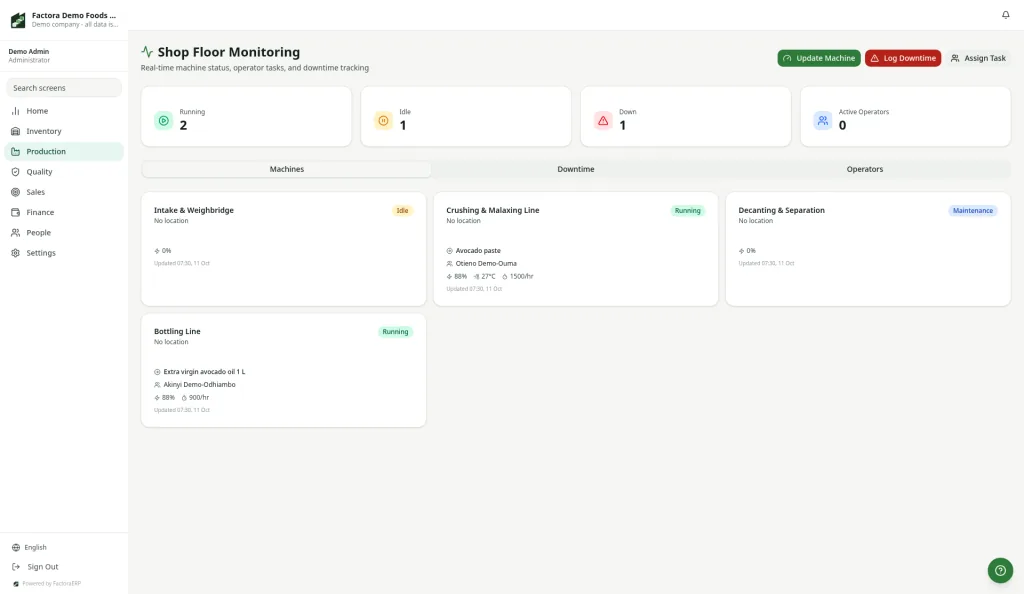
- Open Shop Floor at
/f/<company-slug>/shop-floorbefore you start. Crushing line is Running and Decanting is in Maintenance. Do not send the next stage to a machine that is down. - At each stage, record the actual quantity, the quality reading, the machine hours, and the staff assignment.
- Open the yield analytics tab. Output versus input is shown by stage.
- Compare this run with earlier runs on the same machine and, when the input lot has a supplier, with that supplier.
- A loss that appears at one stage is investigated there, not averaged away across the whole run.
- When the run is finished, follow the factory-operations lesson and push finished goods to storage if that step applies.
Worked example
The figure on this page is Shop Floor, not a run detail. Crushing line is Running and Decanting is in Maintenance. Yield is still output divided by input on the run record. A run of 10,000 kg in and 4,200 kg out is 42 percent, and that arithmetic is not printed on this Shop Floor screenshot. Compare more than one run before you blame the supplier.
Common mistakes
- Leaving the stage on the first step until the end of the day.
- Judging a supplier from a single stage loss.
- Typing a yield that does not match the quantities on the stage.
Recap
- Stages carry quantities, quality, machine hours, and staff.
- Yield is output versus input, by stage.
- Patterns need more than one run.