
Batch Traceability
Trace any product back to its raw materials, supplier, production run, and quality records.
How traceability works
Every batch created at intake carries a unique ID that links it forward through every step — sorting, storage, production, quality testing, and dispatch. The Traceability module shows this end-to-end chain in a visual timeline.
Why it matters
Traceability is essential for food safety recalls, compliance audits, and customer certifications. In case of a quality issue, you can pinpoint the affected batches in seconds instead of days.
Learning objectives
- Open Traceability and read the timeline for one batch
- Follow the ID back to the supplier intake and forward to dispatch
- Use the factory-operations lessons when you need a timed mock recall
Walk the screen
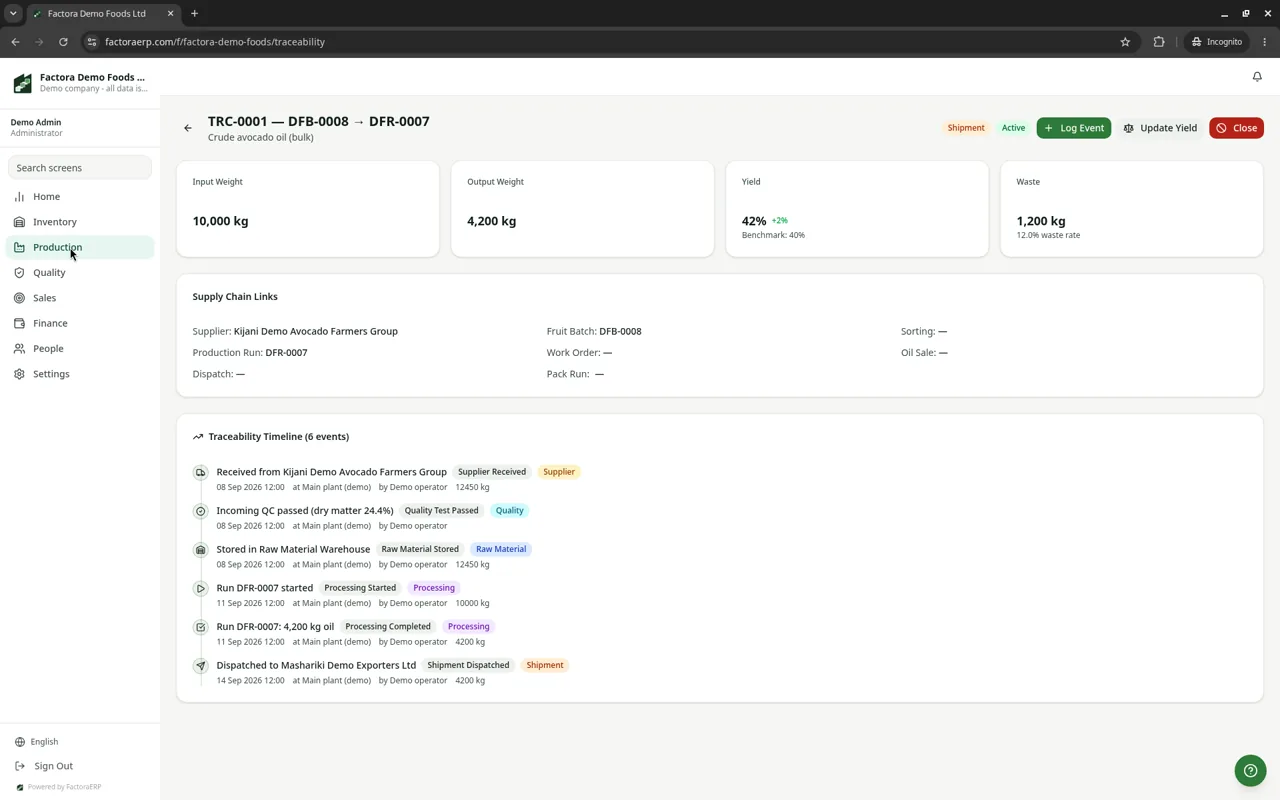
- Open Traceability at
/f/<company-slug>/traceabilityand search the batch. Demo trace TRC-0001 already has six events, including run DFR-0007. - Read the timeline: sorting, storage, production, quality tests, and dispatch, in the order they were recorded.
- If a stage is missing, that stage was not recorded. Do not draw it in by hand.
- Step back to the supplier on the intake. Step forward to the customer on the dispatch.
- When a customer or an auditor asks, start here rather than in email.
- For the practice drill and the recall statuses, use the factory-operations traceability and recall lessons.
Worked example
You search the demo batch and see intake, a lab result, a bin, and a dispatch. Storage is missing. That is a real gap, so Warehouse still needs the movement. You do not tell the auditor the bin from memory.
Common mistakes
- Maintaining the chain in a spreadsheet beside the system.
- Filling a missing stage with a guessed time.
- Looking only at the finished goods name and not the batch ID.
Recap
- The intake ID is the timeline.
- Missing stages mean missing records.
- Back to the supplier, forward to the customer.