
Expert · Security, Governance and Administration Module: Step 1: Access governance
Segregation of duties
The person who raises a payment should not approve it. Use approval workflows to enforce this automatically.
Learning objectives
- State that the person who raises a payment does not approve it
- Use the Approvals page so the chain moves without a side channel
- Apply the same split to purchase orders, payroll runs, and leave
Walk the screen
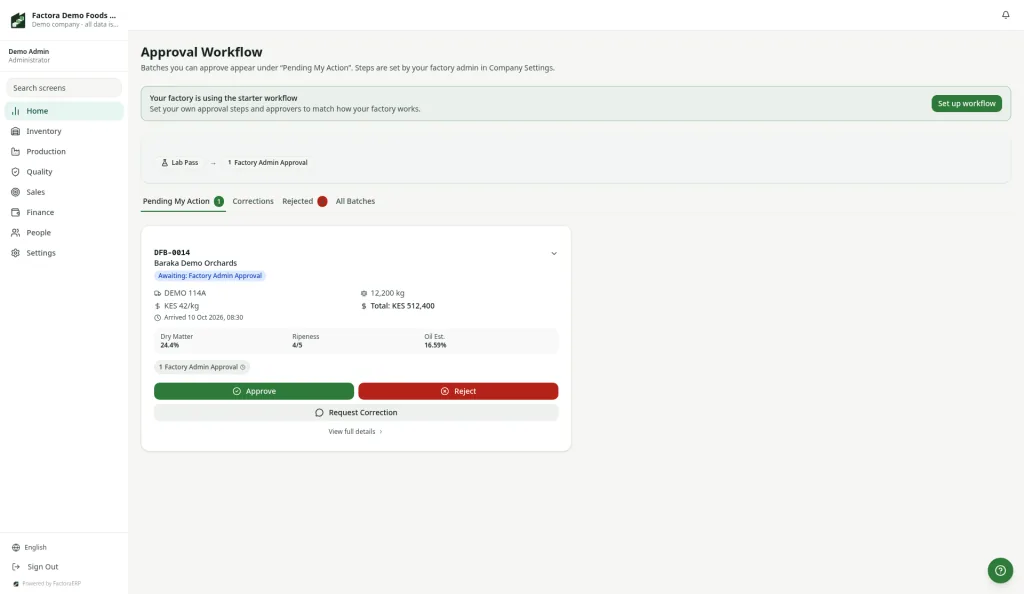
- Open Approvals and read a pending item. Note who submitted it.
- Confirm the approver is a different user. If you are the submitter, the button is not for you.
- For a lot, the person who logged the intake is not the approver. The approver opens
/f/<company-slug>/approvalsand checks the net weight and the lab estimates on the card. - For payroll, the preparer does not approve. HR approves first, then the general manager, then the CEO or director.
- For leave, nobody decides their own request.
- For a high-value purchase, expect more than one level. The request moves to the next person. Do not approve both levels with one login.
Worked example
Demo user Receiving A logs a truck with a wrong price. Receiving A must not approve it. The operations manager opens Approvals, chooses Request Correction, and the lot returns to Receiving A to fix. The manager does not reject the material, because the material is fine and the paperwork is not.
Common mistakes
- Approving your own intake because the manager is out and the truck is waiting.
- Sharing the manager login so receiving can 'finish the approval'.
- Skipping the payroll chain and marking a run paid before HR has approved.
Recap
- The person who raises a payment, a purchase, or a payroll run does not approve it.
- Approvals enforces the chain. Do not replace it with a shared login.
- A paperwork error is a correction. A bad material is a rejection.
Quiz for this module: Step 1: Access governance.