
Foundation · Platform Essentials for Technical Teams Module: Step 2: Working with data
Where data comes from and how it flows.
Data flow
Intake creates a lot. The lab attaches results. Warehouse tracks location. Production consumes and outputs batches. Sales ships them and finance invoices. Nothing is re-typed.
Learning objectives
- Trace a lot from Material Intake to Lab Results, Warehouse, Production, Sales, and Finance
- State which module attaches the test results
- Refuse to re-enter the batch number in the next module
Walk the screen
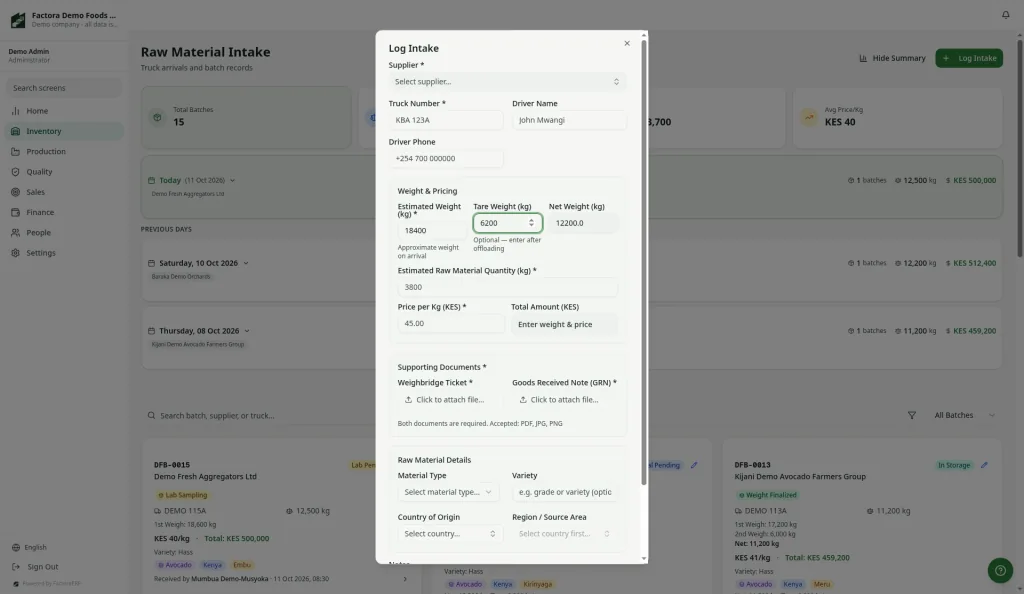
- Start at Material Intake,
/f/<company-slug>/intake. On the demo ticket the estimated gross is 18,400 kg, tare is 6,200 kg, and the calculated net is 12,200 kg. Save as one lot, DFB-0014. Copy that reference onto paper only as a check, not as a new key. - Open Lab Results. The lot is waiting. Submit results against that lot. This is the module that attaches test results.
- After approval, open Warehouse and confirm the lot has a location.
- Open Production and consume that lot on a run. The output batch should reference the input lot.
- Open Sales and dispatch finished product that came from the run. The shipment should still be traceable to the intake.
- Open Finance and invoice the shipment. Do not type the weight again. If the amount looks wrong, correct the source lot rather than overtyping the invoice.
Worked example
A demo truck is gross 18,400 kg and tare 6,200 kg, so the lot stores net 12,200 kg. The lab passes it. Production consumes part of it. Sales ships finished goods. Finance invoices that shipment. Nobody types 12,200 a second time. If finance needs a different quantity, the correction is on the source record.
Common mistakes
- Creating a new product code in Finance because the intake material 'is not the invoice'.
- Attaching the lab sheet in email instead of Lab Results, then wondering why the lot stays Lab Pending.
- Re-keying the net weight on the invoice.
Recap
- Intake creates the lot. Lab attaches results. Warehouse locates it. Production consumes and outputs. Sales ships. Finance invoices.
- Nothing is re-typed between those modules.
- The lab is the module that attaches test results to the lot.