
Foundation · Factory Operations Quick Start Module: Step 2: Quality testing and approval
How approval works
Once a lot passes the lab, it appears in Approvals under Pending Approvals at /f/<company-slug>/approvals. The card shows the lot, the net weight, and the lab estimates: dry matter, ripeness, and oil estimate. Ticket photos stay on the intake form. This card has no documents section.
The approver can:
| Action | When to use it | What happens next |
|---|---|---|
| Approve | Everything is correct | Lot moves to Approved, then Offloading and In Storage |
| Request Correction | Something small is wrong, e.g. wrong price or missing ticket | Lot goes back to the person who logged it to fix and Resubmit |
| Reject | The material should not be accepted | Lot moves to Rejected Batches with the reason recorded |
Writing a useful note
Always add a short approval note or rejection reason. Good: "Rejected - moisture 14% above 9% contract limit, supplier informed." Poor: "bad".
Why corrections are better than rejections for admin errors
A rejection tells the supplier the material is not accepted. If the material is fine but the paperwork is wrong, use Request Correction so the lot is not lost and the supplier is still paid correctly.
Learning objectives
- Check net weight and the lab estimates on the Pending Approvals card
- Choose Approve, Request Correction, or Reject for the reason that actually applies
- Write a note that states the fact, such as a moisture result against the contract limit
Walk the screen
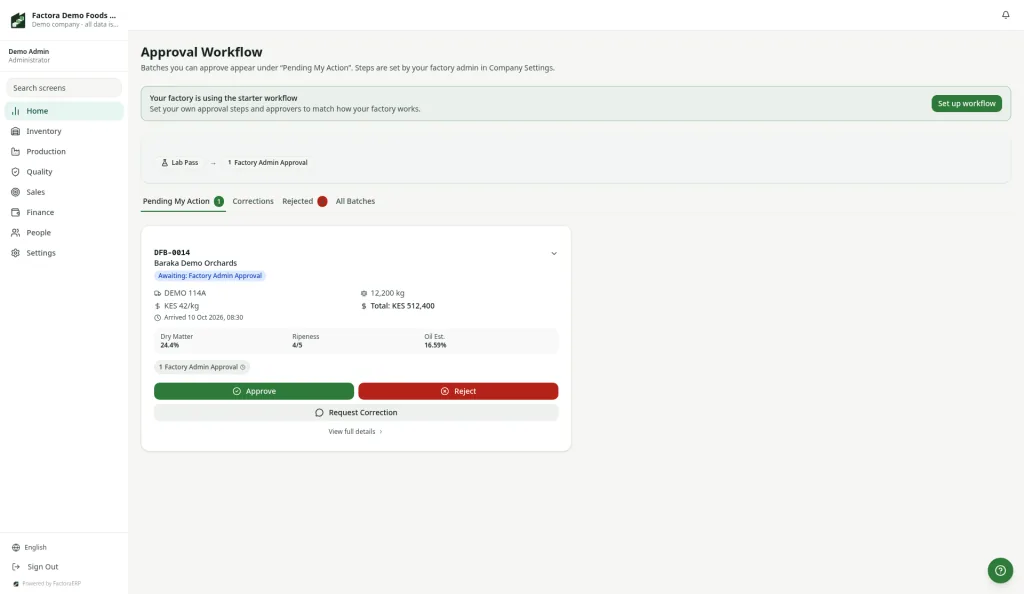
- Open Approvals and Pending Approvals. Open the lot that is Lab Passed.
- On lot DFB-0014, read the 12,200 kg net and the lab estimates: dry matter, ripeness, and oil estimate. The ticket photo is on the intake, not on this card.
- Approve only when those agree. The lot then moves to Approved, then Offloading and In Storage.
- Request Correction when the material is acceptable but something small is wrong, such as the price or a missing ticket. The logger fixes and resubmits.
- Reject when the material should not be accepted. It moves to Rejected Batches with the reason.
- Write the note with the fact. Good: moisture 14 percent against a 9 percent contract limit, supplier informed. Poor: bad.
Worked example
Lot DFB-0014 shows 12,200 kg with dry matter, ripeness, and an oil estimate. The actions are Approve, Reject, and Request Correction. If the paperwork is wrong and the material passed the lab, you choose Request Correction, not Reject. The receiving user fixes it and resubmits. A different lot at 14 percent moisture against a 9 percent limit is Reject, with that sentence as the reason.
Practical tip: decide from the card in front of you. Do not approve because the truck is blocking the gate.
Recap
- Approve, Request Correction, and Reject are different outcomes.
- Paperwork errors go back for correction. Bad material is rejected.
- The note must say the fact, not a single vague word.
Quiz for this module: Step 2: Quality testing and approval.