
Professional · Quality and Compliance in Practice Module: Step 1: Inspections and non-conformances
Incoming inspections, non-conformance reports, corrective actions and recalls - how quality officers keep a factory audit-ready every day.
Prerequisite: Factory Operations Quick Start.
Catch problems early and record them properly.
IQC Inspections
Quality checks happen at intake, during processing and before dispatch.
Open IQC at /f/<company-slug>/iqc. Each inspection captures supplier, raw material, delivery date, quantity, moisture content, oil content, and a decision. The list has no visual-grade column. A row can sit on Pending until you decide:
| Decision | Meaning |
|---|---|
| Accepted | Meets the specification |
| Conditionally Accepted | Usable with limits - e.g. price reduction or use only in a lower grade product |
| Rejected | Does not meet specification; return or dispose |
IQC, IPQC and FQC
- IQC - incoming quality control, at the gate
- IPQC - in-process checks during production
- FQC - final quality control before dispatch
Together they make sure a problem is caught at the cheapest point. Finding a defect at the gate costs a phone call; finding it at the customer costs a recall.
Learning objectives
- Record supplier, material, quantity, moisture, oil content, and a decision
- Use Conditionally Accepted only with the limits written on the inspection
- Tell IQC, in-process checks, and final checks apart
Walk the screen
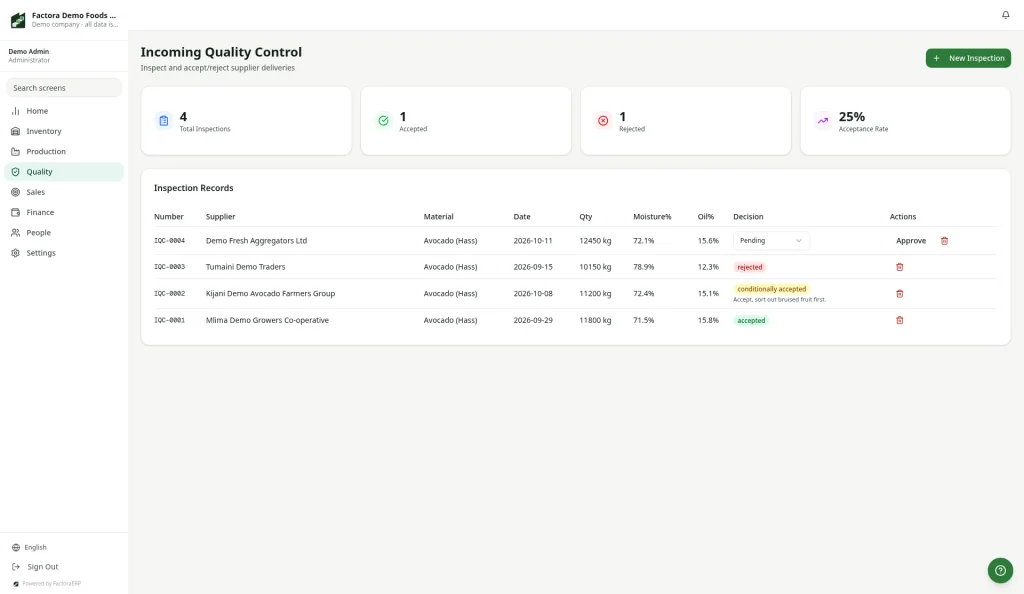
- Open IQC Inspections and start an inspection for the incoming delivery.
- Fill supplier, raw material, delivery date, and quantity from the lot, not from memory.
- Enter moisture content and oil content. Do not look for a visual-grade column.
- Set the decision: Accepted when it meets specification, Conditionally Accepted when it is usable only with limits such as a price reduction or a lower-grade product, Rejected when it must be returned or disposed of.
- Write the limits on a conditional decision. A blank condition is not a decision.
- Remember the later checks: IPQC during production and FQC before dispatch. They are not substitutes for this incoming inspection.
Worked example
IQC-0004 is Avocado (Hass), 12,450 kg, moisture 72.1 percent, oil 15.6 percent, and the decision is still Pending. You do not mark it Accepted to keep the truck moving. If the contract allows a limit, you mark Conditionally Accepted and write the limit. If it does not meet specification, you mark Rejected. FQC is still required later on what you do accept.
Practical tip: Pending means no decision yet. Do not tell production that IQC-0004 has passed.
Common mistakes
- Using Accepted because the truck is blocking the gate.
- Conditionally Accepted with no limit written down.
- Skipping IQC because FQC will catch it.
Recap
- IQC is at the gate, IPQC is during production, FQC is before dispatch.
- The three decisions are Accepted, Conditionally Accepted, and Rejected.
- A condition must state the limit.