
Foundation · Factory Operations Quick Start Module: Step 3: Sorting, storage and production
Storing stock in the Warehouse
Every pallet and bag should be in a known bin, linked to its lot.
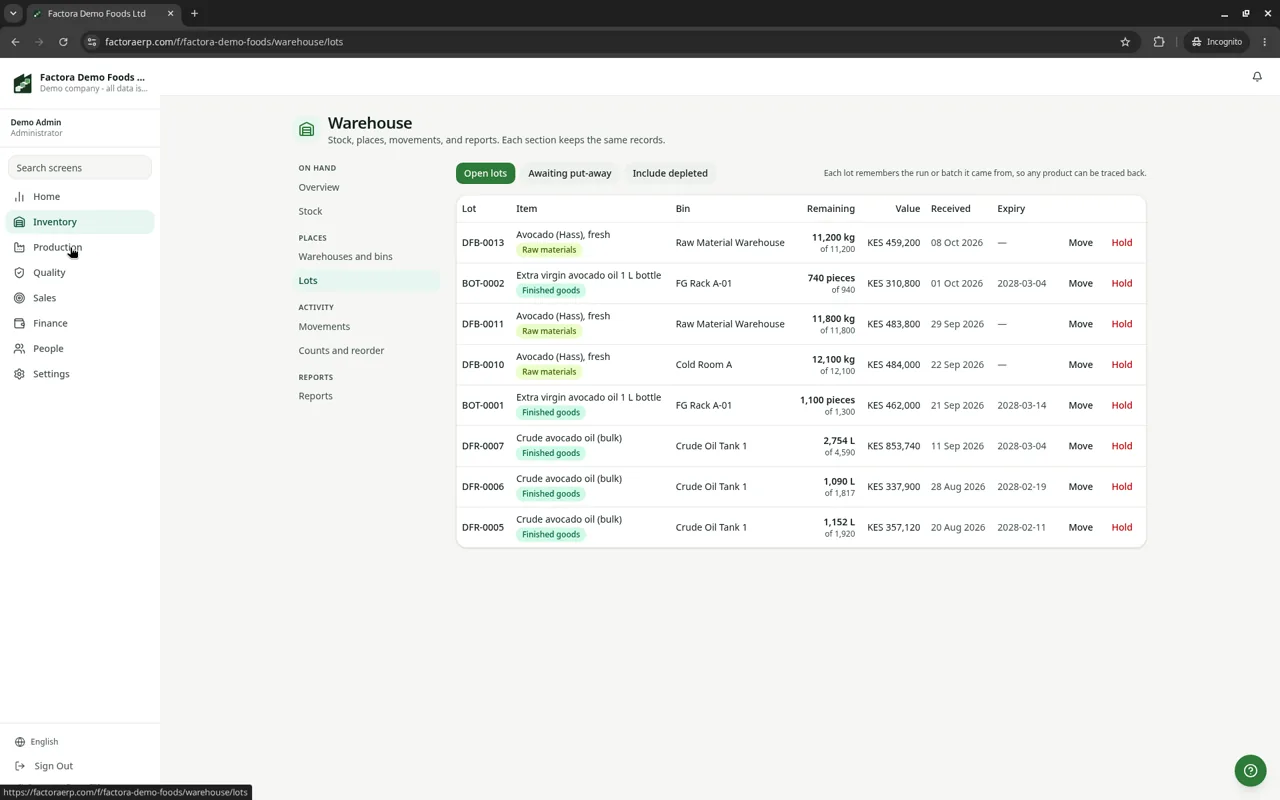
The Warehouse screen shows stock by warehouse and bin. Use the Lots tab to find where a specific lot is, and the Movements tab to see its history.
- Always record a movement when you physically move stock. If the system and the shelf disagree, the next person cannot find it.
- Use Counts for regular stock takes. Differences are recorded as adjustments with a reason.
Running production
Production runs consume lots and create finished batches.
Open Production and Start production run. Record:
- Run number and the lots used as input
- Input weight
- Output of finished product
- Quality grade and machine status
Factora calculates the extraction rate (output / input). When the run is complete, use Push to storage so the finished product appears in the warehouse and is available for sale.
Watch the extraction rate
A sudden drop in extraction rate is an early warning - it can mean poor input quality, a machine problem, or a recording error. Tell your supervisor the same day.
Learning objectives
- Find a lot on the Lots tab and record a movement when it physically moves
- Use Counts for a stock take, with a reason on any adjustment
- Start a production run with input and output, then Push to storage and watch the extraction rate
Walk the screen
- Open Warehouse Lots at
/f/<company-slug>/warehouse/lots. DFB-0010 is in Cold Room A. Use Movements for its history. - When you move a pallet, record the movement the same time. Do not wait for the end of the shift.
- Use Counts for a stock take. An adjustment needs a reason, such as damage or evaporation.
- Check Shop Floor at
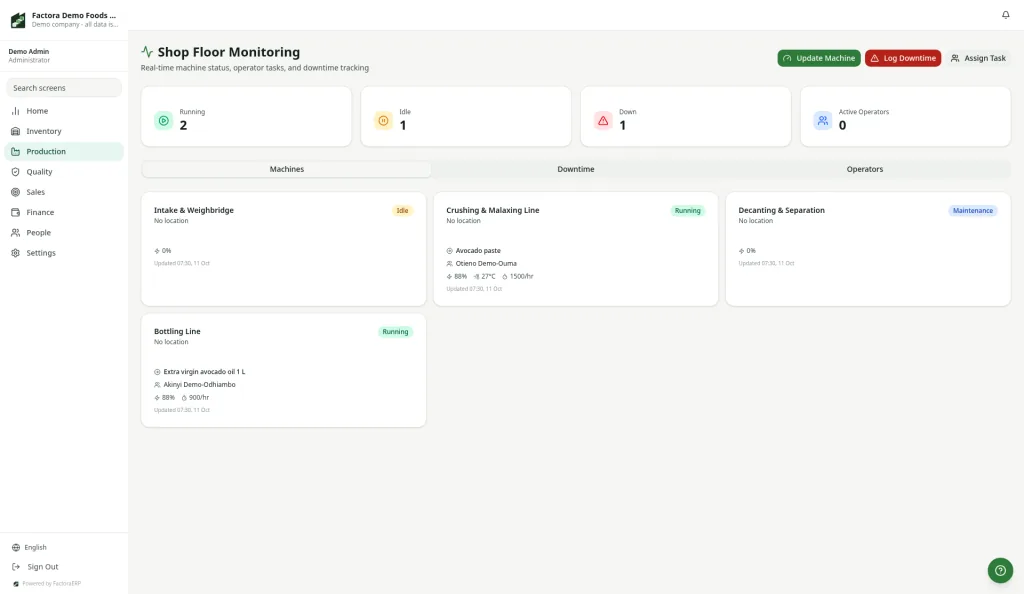
/f/<company-slug>/shop-floorbefore you start. Crushing line is Running and Decanting is in Maintenance. Then start the production run: record the run number, the input lots, the input weight, the output, the quality grade, and the machine status. The Shop Floor figure is not the run itself. - Read the extraction rate, output divided by input. Tell a supervisor the same day if it drops suddenly.
- When the run is complete, Push to storage so the finished product is in the warehouse and available for sale.
Worked example
A demo run takes 10,000 kg in and 4,200 kg out. Extraction rate is 42 percent. That arithmetic is the worked example. It is not printed on the Shop Floor screenshot, which only shows Crushing line Running and Decanting in Maintenance. You push the finished output to storage. Lot DFB-0010 in Cold Room A gets a movement if you physically move it. A count that is short is an adjustment with a reason, not a quiet edit.
Recap
- Warehouse Lots and Movements must match the floor.
- Extraction rate is output divided by input. The worked example is 42 percent.
- Push to storage after the run so the product can be sold.
Badge
Completing this level is the badge Floor Ready.
Badge on completion: Floor Ready
Quiz for this module: Step 3: Sorting, storage and production.