
Foundation · Factory Operations Quick Start Module: Step 3: Sorting, storage and production
Turn approved lots into graded stock and finished product.
Sorting & Grading
Approved material is often sorted before it is stored or processed. Open Sorting & Grading and look at the Waiting tab.
- Click Start sorting session on the lot. It moves to In Progress.
- Weigh what goes into the sorting line - the input weight.
- As each grade comes off the line, record the kg in each bucket (for example Grade A, Grade B, rejects).
- Factora calculates yield % for each grade.
- Finish the session to move it to Completed, then Send to production or store it.
Check your numbers
The bucket weights should add up to the input weight, minus normal loss. A large gap usually means a bucket was not weighed - check before completing.
Example: input 2,000 kg. Grade A 1,450 kg, Grade B 380 kg, rejects 150 kg. Total 1,980 kg, loss 20 kg (1%). Grade A yield is 72.5%.
Learning objectives
- Start a session from the Waiting tab and record input weight
- Enter each grade bucket and read the yield FactoraERP calculates
- Hold completion when the buckets do not add up to the input, allowing only normal loss
Walk the screen
- Open Sorting at
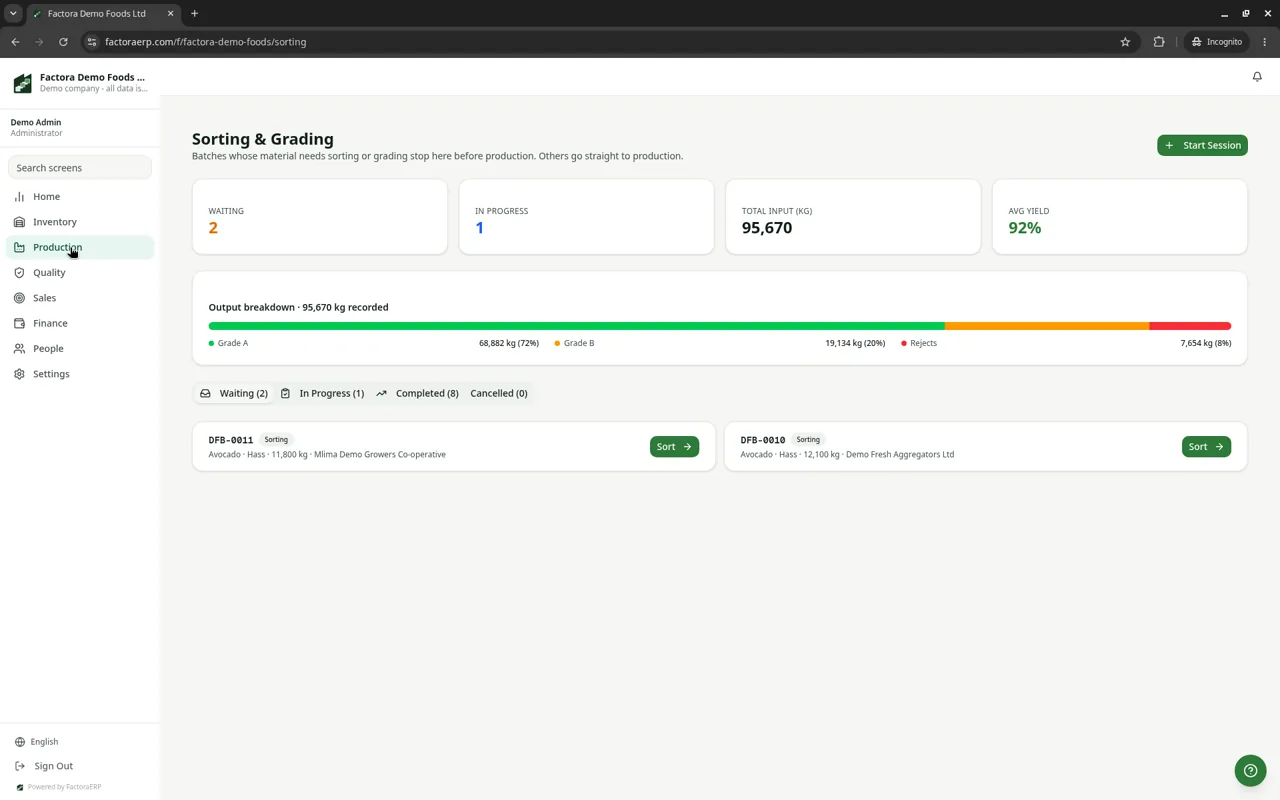
/f/<company-slug>/sortingand the Waiting tab. Demo lots DFB-0011 and DFB-0010 are waiting, with a Grade A, Grade B, and Rejects bar. Start a session on the approved lot. It moves to In Progress. - Weigh what goes onto the line. That is the input weight.
- As grades leave the line, weigh each bucket, for example Grade A, Grade B, and rejects.
- Read the yield percent FactoraERP calculates for each grade. Do not type a yield over the top.
- Add the buckets. They should meet the input minus normal loss. A large gap means a bucket was not weighed.
- Finish the session so it is Completed, then Send to production or store it.
Worked example
The Waiting screenshot is not a finished session. The arithmetic you use once a session is underway is separate: input 2,000 kg, Grade A 1,450 kg, Grade B 380 kg, rejects 150 kg. The buckets total 1,980 kg, so loss is 20 kg, about 1 percent. Grade A yield is 72.5 percent. You complete the session only after that check. If the buckets had totalled 1,450 kg, you would look for the missing Grade B and reject weights before completing.
Common mistakes
- Completing a session when a bucket was never weighed.
- Typing the yield by hand because the calculated one looks low.
- Starting a session on a lot that is still Lab Pending.
Recap
- Waiting, then In Progress, then Completed.
- Buckets should add up to the input, minus normal loss.
- Grade A yield in the worked example is 72.5 percent.